


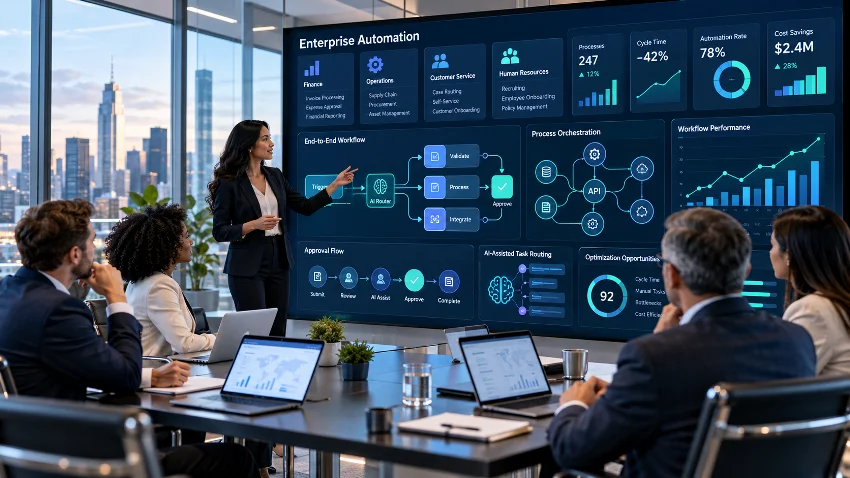
Running a large organization involves thousands of repetitive decisions, complicated workflows, and constant communication between departments. When these processes depend too heavily on manual work, operational costs rise, mistakes multiply, and productivity suffers.
That’s why Business Automation has become an important part of modern enterprise strategy.
But successful automation involves much more than replacing spreadsheets with software or introducing a few AI-powered tools. Companies need reliable architecture, connected applications, intelligent workflows, and measurable performance standards. Understanding how these elements work together helps organizations build scalable automation environments that improve efficiency without sacrificing flexibility, security, or operational control.
1. Understanding Enterprise Business Automation and Its Strategic Value
Enterprise automation refers to the coordinated use of technology to execute, monitor, and improve business processes across an organization.
It combines software integration, workflow management, robotic process automation, artificial intelligence, and data-driven decision-making to reduce unnecessary manual intervention.
Unlike small-scale task automation, enterprise solutions must work across multiple departments, legacy applications, cloud services, and different operational environments.
Moving Beyond Simple Task Automation
Traditional automation often focuses on individual activities such as generating invoices, sending notifications, or transferring customer information between applications.
These functions are helpful, but their impact remains limited when departments operate independently.
For example, automating invoice creation saves time for accounting teams. However, connecting invoice generation with purchasing approvals, inventory records, supplier management, and payment processing creates a much broader operational improvement.
This coordinated approach is commonly associated with business process automation and end-to-end workflow orchestration.
Why Automation Needs a Business Strategy
Technology investments produce better results when they address identifiable operational problems.
An organization might want to reduce customer onboarding delays, improve financial reporting accuracy, or accelerate order fulfillment.
Each objective requires different workflows, integrations, and performance measurements.
Companies should begin by identifying where manual activities create bottlenecks rather than purchasing automation tools simply because they’re popular.
The goal is to create operational improvements that employees, customers, and business leaders can actually measure.
Understanding Automation Maturity
Organizations generally develop automation capabilities in stages.
Early initiatives often target repetitive administrative tasks. More advanced programs integrate applications, coordinate cross-departmental processes, and use analytics to improve decisions.
At higher maturity levels, companies establish reusable automation components, centralized governance, and continuous performance evaluation.
However, maturity doesn’t mean automating every activity.
Some decisions require human judgment, professional expertise, or direct customer interaction, regardless of technological sophistication.
2. Designing Scalable Enterprise Automation Architecture
Architecture determines whether automation solutions remain reliable when transaction volumes, employee numbers, and integration requirements increase.
A strong technical foundation should support flexibility without introducing unnecessary complexity.
Building a Layered Automation Architecture
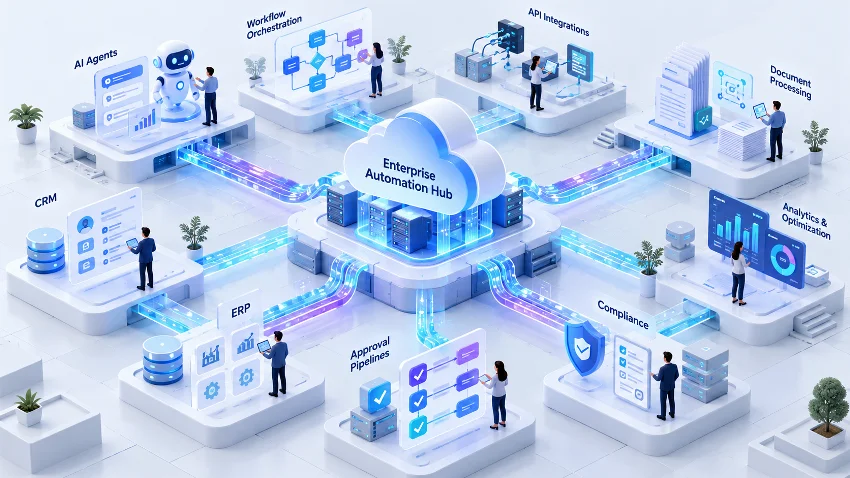
Enterprise automation platforms commonly separate their capabilities into distinct architectural layers.
The presentation layer provides employee dashboards, approval interfaces, and administrative controls.
A workflow orchestration layer coordinates activities, executes business rules, manages process states, and handles exceptions.
Below that, an integration layer communicates with databases, enterprise applications, external APIs, and legacy infrastructure.
The data layer maintains transactional records, workflow histories, performance information, and operational logs.
This separation allows engineering teams to improve individual components without rebuilding the entire platform.
API-First Integration and Service Connectivity
Application programming interfaces provide structured communication between business systems.
For example, a sales platform can send an approved order to an enterprise resource planning system through an API.
The ERP system may then initiate inventory checks, billing procedures, and fulfillment activities.
An API gateway can provide centralized authentication, request validation, traffic management, and service routing.
Microsoft’s Azure Architecture Center illustrates how API management and workflow orchestration can connect enterprise applications through reusable integration services.
An API-first approach also makes it easier to introduce new applications without creating completely seperate integration frameworks.
Event-Driven Architecture for Real-Time Operations
Traditional request-response integration works well when applications need immediate answers.
However, many enterprise workflows involve activities that can occur asynchronously.
Event-driven architecture allows systems to react when important business events occur.
For example, an event such as “Payment Confirmed” can trigger inventory updates, shipping preparation, customer notifications, and financial reconciliation.
Message brokers distribute these events to interested services, reducing the need for tightly coupled application connections.
This approach supports scalability, but architects must consider duplicate events, processing delays, ordering requirements, and eventual consistency.
Microservices Versus Modular Platforms
Microservices separate application capabilities into independently deployable services.
A company might maintain distinct services for document processing, customer verification, payment approval, and workflow notifications.
This architecture can provide flexibility, especially when different components have significantly different scaling requirements.
However, distributed services introduce additional monitoring, networking, security, and deployment responsibilities.
For some organizations, a modular monolithic application offers a simpler and more economical foundation.
Architecture decisions should reflect actual operational needs rather than the assumption that more services automatically mean better scalability.
3. Integrating Artificial Intelligence Into Enterprise Workflows

Artificial intelligence introduces capabilities that traditional rules-based systems cannot easily reproduce.
Instead of handling only predefined conditions, AI-enabled systems can interpret unstructured information, classify documents, generate summaries, and assist with complex decisions.
However, incorporating intelligence into workflows requires clear boundaries.
Combining Rule-Based Automation With AI
Deterministic automation follows explicit instructions.
For example, a purchasing system might automatically approve orders below a specified amount when the supplier and budget meet predefined criteria.
AI becomes useful when a task requires interpreting information that doesn’t follow a consistent format.
An intelligent document processing system might extract invoice details from different layouts before sending the information to a validation workflow.
The extracted data should still pass through defined verification rules before any payment is authorized.
This combination offers flexibility while maintaining operational control.
AI Agents and Intelligent Process Orchestration
AI agents can perform multi-step tasks using language models, business applications, and external tools.
For example, a customer service agent may analyze an incoming request, retrieve relevant account information, prepare a response, and recommend the next action.
More advanced architectures allow agents to coordinate specialized tools or other agents through a central orchestrator.
AWS Prescriptive Guidance describes workflow orchestration patterns that coordinate execution, maintain process context, and manage interactions between AI components.
However, enterprise agents should operate within clearly defined permissions.
An agent that summarizes financial information requires different privileges from one authorized to modify financial transactions.
Human-in-the-Loop Decision Management
Not every automated recommendation should result in an immediate action.
High-impact decisions involving payments, legal obligations, employment, or sensitive customer records may require human approval.
Consider a loan processing workflow that uses AI to organize applications and identify missing documents.
The system can accelerate administrative work while routing important decisions to authorized professionals.
Human-in-the-loop designs help preserve accountability and provide opportunities to correct mistakes before they affect customers.
They also make it easier to investigate questionable outputs and refine system behavior.
Managing AI Accuracy and Reliability
AI systems can generate incorrect information, misunderstand context, or produce inconsistent results.
Organizations should evaluate models against representative business scenarios before integrating them into production workflows.
Useful safeguards include structured output validation, confidence-based escalation, restricted tool permissions, and independent verification of critical information.
The NIST AI Risk Management Framework provides guidance for identifying, evaluating, and managing risks associated with AI technologies.
Enterprises should treat these safeguards as essential engineering requirements rather than optional compliance features.
4. Developing an Enterprise Workflow Automation Strategy
An effective automation roadmap starts with process understanding, not software configuration.
Organizations need to identify which workflows deserve investment and how improvements will affect employees, customers, and existing systems.
Process Discovery and Workflow Mapping
Before automating a process, teams should understand how it currently operates.
This involves examining task sequences, approval requirements, exceptions, handoffs, and dependencies between departments.
Business Process Model and Notation, commonly called BPMN, provides a standardized way to represent workflows visually.
Camunda’s process modeling documentation demonstrates how BPMN can describe activities, decision points, and execution paths.
Consider a procurement workflow involving purchase requests, budget verification, supplier selection, approval, and payment.
Mapping these activities often reveals unnecessary approvals, repeated data entry, or unclear responsibilities.
Eliminating these inefficiencies before automation prevents companies from simply making inefficient processes run faster.
Prioritizing High-Impact Automation Opportunities
Not every workflow delivers the same potential value.
Companies should assess candidates using transaction volume, manual effort, error frequency, process stability, business impact, and implementation complexity.
A practical prioritization model can use weighted scores for each factor.
For example, suppose invoice processing requires 12 minutes of manual activity per transaction and the organization handles 20,000 invoices monthly.
That’s approximately 4,000 hours of monthly processing effort.
If automation eliminates seven minutes of manual work per invoice, the theoretical capacity released equals roughly 2,333 hours per month.
Actual savings will depend on exception rates, verification requirements, employee utilization, and ongoing system maintenance.
Designing End-to-End Process Orchestration
Workflow orchestration coordinates tasks across applications, employees, and automated services.
A customer onboarding process might begin when a contract is signed.
The workflow can then initiate identity verification, account creation, document storage, compliance checks, and welcome communications.
If an activity fails, the orchestration engine should identify the problem and determine whether to retry, request human intervention, or stop the process.
This is particularly important for long-running workflows that span multiple systems.
A well-designed orchestration strategy maintains process visibility instead of leaving users to investigate disconnected system logs.
Managing Exceptions and Process Changes
Real-world workflows rarely follow a perfect sequence.
Customers provide incomplete information, external APIs become unavailable, and business policies change.
Automation architectures should anticipate these situations.
For example, temporary integration failures may justify controlled retries, while invalid financial data should trigger a review rather than repeated processing.
Changes to workflow rules also require version control, testing, and approval procedures.
Without these controls, small adjustments can unexpectedly disrupt other departments.
5. Security, Governance, and Risk Management
Automation increases operational efficiency, but it can also extend the consequences of technical mistakes.
A misconfigured automated process might modify thousands of records before an employee notices the problem.
Security and governance must therefore be embedded throughout the automation lifecycle.
Identity Management and Least-Privilege Access
Automated services should receive only the permissions required to complete their assigned tasks.
A workflow responsible for reading customer information should not automatically possess permission to delete customer accounts.
Service identities, role-based authorization, and short-lived credentials help reduce unnecessary access.
Sensitive credentials should be managed through secure secret-management systems instead of being embedded directly in workflow definitions.
Regular permission reviews are particularly important as organizations introduce new integrations.
Protecting AI-Powered Automation
AI-enabled workflows introduce additional security concerns.
Prompt injection can attempt to manipulate model behavior through untrusted instructions embedded in documents, messages, or retrieved information.
Other risks include sensitive information exposure, excessive tool permissions, and insecure handling of generated outputs.
The OWASP Top 10 for LLM Applications identifies major security risks associated with integrating large language models into software systems.
Organizations should isolate untrusted content, validate tool requests, limit agent authority, and review sensitive actions.
Human approval can provide another safeguard for operations with financial or legal consequences.
Establishing Enterprise Automation Governance
Governance defines who may create, modify, deploy, and monitor automated workflows.
A centralized automation center of excellence can establish technical standards while allowing departments to propose suitable use cases.
Typical governance responsibilities include solution reviews, access management, documentation, testing requirements, and performance reporting.
Organizations should also maintain clear ownership for each production workflow.
When an automated process fails, responsibility for investigation and recovery must be immediately identifiable.
Data Privacy and Auditability
Automated workflows frequently transfer information between systems.
Companies need visibility into which information is processed, where it’s stored, and who can access it.
Audit logs should capture meaningful workflow events without unnecessarily exposing sensitive content.
Retention periods must align with legitimate business requirements and applicable regulations.
For regulated organizations, documenting decision logic and approval histories can be just as important as recording the final transaction.
6. Optimizing Automation Performance, Reliability, and Cost
Launching automated workflows is only the beginning.
Operational performance changes as transaction volumes increase, software dependencies evolve, and business requirements become more complicated.
Continuous optimization helps maintain long-term value.
Measuring Automation Performance
Effective performance measurement requires more than counting completed automated tasks.
Organizations should evaluate process completion time, error rates, exception frequency, manual intervention, and service availability.
For example, reducing average order-processing time from 40 minutes to 15 minutes represents a 62.5% improvement in processing speed measured by elapsed time reduction.
However, faster processing has limited value if transaction accuracy declines.
Performance dashboards should combine efficiency measures with quality and reliability indicators.
Monitoring Workflow Execution
Monitoring systems should provide visibility into both technical infrastructure and business process outcomes.
Technical monitoring includes API latency, resource utilization, execution failures, and queue processing delays.
Business monitoring focuses on incomplete orders, delayed approvals, failed payments, and unresolved customer requests.
Distributed tracing helps engineering teams follow transactions as they move between services.
Alerts should emphasize operationally significant failures rather than generating excessive notifications for harmless events.
Improving Resilience and Fault Recovery
Enterprise processes must tolerate unexpected failures.
A reliable architecture can include retry policies, dead-letter queues, timeout controls, circuit breakers, and recovery procedures.
Idempotency is particularly important for transactional workflows.
An idempotent operation can be safely repeated without creating unintended duplicate results.
For example, retrying a payment request should not result in charging a customer twice.
Systems also need strategies for compensating actions when a multi-step operation partially succeeds.
These mechanisms reduce the risk of minor technical problems becoming major operational incidents.
Evaluating Automation ROI
Financial performance should be measured throughout the lifecycle of an automation initiative.
A simplified return on investment calculation is:
Automation ROI (%) = [(Annual Net Benefits − Total Automation Costs) / Total Automation Costs] × 100
Suppose an enterprise spends $180,000 implementing and operating an automation program during its first year.
The program generates $300,000 in validated annual benefits after accounting for ongoing operational effects.
The estimated first-year ROI would be approximately 66.7%.
These figures are illustrative rather than industry benchmarks.
Real evaluations should distinguish labor capacity released from actual cash savings and include licensing, maintenance, infrastructure, training, and exception-handling costs.
The most useful ROI analysis also considers scalability, service quality, risk reduction, and strategic flexibility.
7. Building a Sustainable Automation Roadmap
Enterprise automation should develop through manageable stages rather than a series of disconnected technology purchases.
A sustainable roadmap combines business priorities, employee involvement, technical architecture, and continuous improvement.
Starting With Controlled Pilot Projects
Pilot projects allow organizations to test assumptions before expanding.
A finance department might begin with automated invoice classification and approval routing.
The initial pilot should establish baseline performance, define success criteria, and identify likely exceptions.
Once the process demonstrates reliable results, the organization can expand it to additional departments or transaction categories.
This approach reduces implementation risk while generating practical knowledge for future initiatives.
Encouraging Employee Adoption
Employees are more likely to support new systems when they understand how automation changes their responsibilities.
Communication should explain which tasks are being automated, where human decisions remain necessary, and how employees can report problems.
Training should cover exception handling, workflow monitoring, and revised operating procedures.
Involving frontline teams during implementation often reveals process details that technical designers initially overlook.
Successful adoption depends on building confidence, not simply installing new software.
Establishing Continuous Improvement Practices
Automation platforms require regular reviews.
Organizations should examine workflow analytics, employee feedback, infrastructure performance, and changing business policies.
A process that performed well during implementation may need adjustment after transaction volumes double.
Teams should also monitor unused automations, duplicate workflows, and unnecessary integrations that increase maintenance costs.
Periodic architectural reviews help prevent automation sprawl and preserve operational consistency.
8. Future Trends in Intelligent Enterprise Automation
The next stage of enterprise automation will likely involve closer collaboration between traditional workflow engines, AI models, and connected business applications.
However, greater intelligence doesn’t eliminate the need for predictable execution.
Agentic Automation and Autonomous Operations
Agentic systems can interpret objectives, select tools, and perform multi-step activities with varying degrees of autonomy.
For example, an AI-enabled operations assistant might investigate a delayed shipment, retrieve supporting records, and recommend corrective actions.
The organization can allow low-risk activities to execute automatically while requiring approval for expensive or irreversible decisions.
Future systems may offer greater adaptability, but businesses will still need traceable actions and clearly defined authorization boundaries.
Hyperautomation and Connected Ecosystems
Hyperautomation combines technologies such as workflow orchestration, robotic process automation, machine learning, process mining, and intelligent document processing.
Instead of improving isolated tasks, the objective is to automate suitable activities across larger operational processes.
A connected enterprise ecosystem can coordinate suppliers, internal departments, customer-facing applications, and analytics platforms.
However, integration quality and data consistency will remain essential.
Adding more automation tools without a coherent architecture can increase complexity rather than reduce it.
Predictive Process Optimization
Predictive analytics can help organizations anticipate workflow bottlenecks and resource requirements.
For example, historical order data may help forecast transaction surges during seasonal demand.
Automation infrastructure can then adjust processing capacity or notify operational teams before service levels deteriorate.
These capabilities are most effective when supported by reliable historical data, continuous model evaluation, and appropriate human oversight.
The future of enterprise automation is not simply about removing manual work. It’s about creating adaptable operating environments that combine technical intelligence with accountable decision-making.
Enterprise Business Automation delivers its greatest value when intelligent workflows, scalable architecture, and operational strategy work together. API integration, AI-assisted processing, strong governance, and continuous performance monitoring help organizations improve efficiency without losing control.
Rather than automating everything at once, businesses should identify high-impact opportunities, validate results, and expand strategically.